
Losing a folder of family photos or the only copy of a customer project is unsettling. When a computer will not start, an external drive disappears, or an important document will not open, the next step can affect what remains recoverable. For data recovery, Vancouver WA customers can start with a local evaluation before trying repairs that change the original storage.
i-5 Computers evaluates inaccessible HDDs, SSDs, USB drives, and Windows or Mac storage at its Vancouver shop. Recovery depends on the failure, the condition of the media, encryption, and whether the original data still exists. This guide explains what to do first, how different devices affect recovery, and what to ask before authorizing work.
What to Do Immediately After Data Loss
Preserve the original device before trying to make it work again. A computer that cannot boot may still contain readable files; a drive that appears empty may have a damaged file system rather than erased contents.
- Stop new activity. Avoid downloads, updates, installations, and saving files to the affected drive.
- Stop if there are physical warning signs. Clicking, grinding, burning smells, liquid exposure, or repeated disconnections warrant professional guidance rather than another restart.
- Check existing copies from another healthy device. Look for backups, cloud version history, emailed attachments, and copies on other computers.
- Record what happened. Note the error, device model, last successful access, and any deletion, drop, update, or attempted repair.
- Keep encryption information available. A BitLocker or FileVault recovery key may be essential. Arrange a secure way to provide access; do not put keys or passwords in a general contact form.
Microsoft’s Windows File Recovery guidance explains why minimizing computer use matters: space occupied by deleted files can be overwritten. If the files are irreplaceable or the device seems unstable, obtain an evaluation before running a scan.
Why Files Disappear or Become Inaccessible
Accidental deletion and formatting
Emptying the Recycle Bin, deleting the wrong folder, or selecting the wrong disk during setup can remove access to files. Deleted files recovery may be possible when the underlying contents remain. Continued use, overwriting, and SSD cleanup processes can eliminate that opportunity. A quick format and a full overwrite are different events, so explain exactly what happened.
Corrupted files and file systems
A file system is the structure that tells a computer where files are stored. Damage to that structure can make a drive appear unreadable. Damage inside an individual file can prevent a photo, document, or database from opening even when its name remains visible. Corrupted file recovery may produce complete files, partial contents, or no usable result; finding a filename is not proof that the file is intact.
Hardware failure, crashes, and damaged connections
Storage wear, electrical faults, damaged connectors, and physical impacts can interrupt access. An operating-system crash can also leave files inaccessible without destroying them. Conversely, crashes can be a symptom of failing storage. A technician must distinguish those possibilities before reinstalling Windows or replacing parts.
If your PC repeatedly restarts, our Windows blue-screen and boot-loop guide explains common symptoms. When important files are not backed up, make data preservation the first priority.
HDD vs. SSD Data Recovery: What Changes?
Hard disk drive data recovery
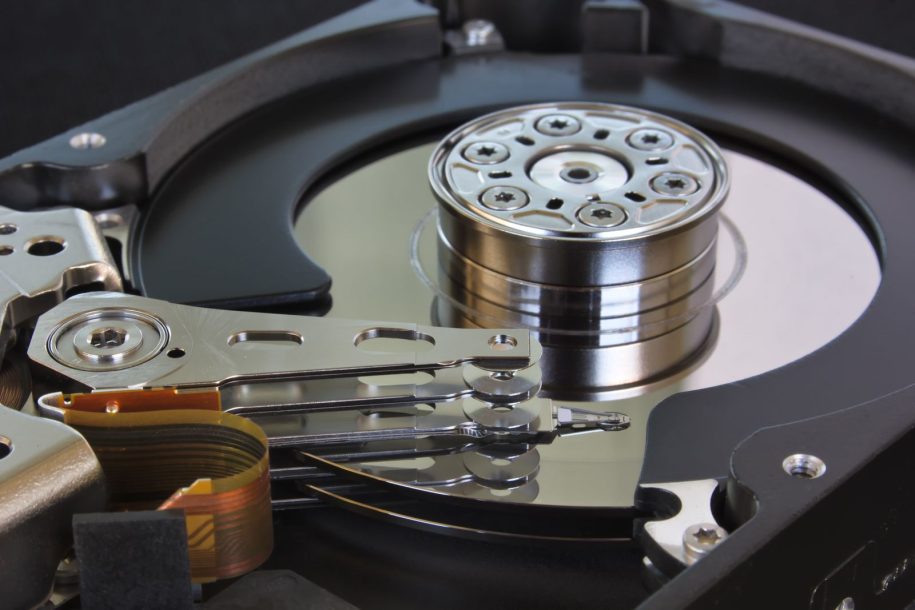
A traditional hard disk drive stores information magnetically on spinning platters. Problems may involve the file system, electronics, read/write heads, or the recording surface. A drive can be detected by the computer and still be failing.
Failed hard drive data recovery sometimes remains possible, but repeated reads can stress an unstable device. Unusual mechanical noises are a reason to stop. Seagate’s hard-drive troubleshooting guidance identifies repeated tapping or clicking as possible signs of failure and distinguishes data recovery from repair steps that may erase files.
Do not open the drive’s sealed casing or try freezer tricks. Some physical failures need specialist laboratory work. Ask what can be evaluated locally and whether your particular failure requires a different recovery route.
SSD data recovery and deleted files
Solid-state drives use flash memory rather than spinning platters. An SSD can fail silently through controller, firmware, electrical, or memory problems. The absence of clicking does not establish that it is healthy.
Deleted files present an additional challenge. TRIM allows an operating system to identify storage that is no longer needed, and the SSD can reclaim it through internal cleanup. Once the relevant contents have been erased, recovery software cannot recreate them. Kingston explains the relationship between these processes in its TRIM and garbage-collection overview.
Not every SSD failure is a deletion case. Files might remain on an inaccessible device, but recoverability depends on its design, condition, and encryption. An SSD data recovery service should explain those limits rather than promise a result based only on the drive’s capacity or brand.
External Hard Drive Recovery and USB Flash Drives
An external storage device includes more than the drive itself. Its cable, power supply, connector, and enclosure can all affect access. A missing drive letter does not identify which component has failed.
If a previously working device asks to be initialized or formatted, cancel the prompt when you need the files. Tell the technician whether it was dropped, connected to a different computer, or disconnected during a transfer. Keep the original enclosure and power adapter with it; some designs depend on their original electronics.
USB flash drive data recovery can involve a bent connector, damaged circuitry, flash-memory wear, or file-system corruption. Do not keep wiggling a broken connector or attempt soldering on the only copy of your files. Photograph any visible damage and leave the device disconnected until you receive handling advice.
How Professional Data Recovery Services Work
The goal is to recover useful information while limiting further damage. A good file recovery service separates diagnosis, approval, recovery, and verification rather than treating every storage problem as a routine computer repair.
1. Explain the failure and identify priority files
Describe the symptoms and previous attempts honestly. List the folders, filenames, file types, and approximate dates that matter most. A few essential accounting documents may be more important than hundreds of gigabytes of replaceable downloads.
2. Evaluate the storage and discuss options
i-5 Computers’ data recovery services in Vancouver, WA begin with an evaluation and an explanation of practical options. Ask about limitations, destination storage, the estimate, and what happens if useful files cannot be recovered.
3. Preserve the source and recover accessible data
In professional recovery generally, a suitable image or clone can let a technician work from a copy instead of repeatedly accessing the original. Whether imaging is appropriate depends on the failure; an unstable device may require specialist handling first. Recovered files should go to separate, healthy storage.
4. Verify results before deciding on repairs
Open representative photos, documents, and other priority files from the recovered copy. Check completeness rather than relying only on a file count. Keep the original device until you understand the results and have a second copy of anything important.
Hard drive repair and data recovery are different goals. Temporarily restoring access does not make a failing drive reliable for future use. After the data is protected, computer repair can address the underlying startup, hardware, or software issue.
PC and Mac Data Recovery
PC data recovery may involve a Windows startup failure, damaged partition, unreadable external disk, or BitLocker-protected drive. Replacing a failed screen or power component might restore access, but a Windows reset should not be the first experiment when the files exist nowhere else.
Mac data recovery likewise depends on the model, storage, failure, and available credentials. Some Macs have integrated storage and hardware-linked encryption that complicate recovery. A recovery key or working access credentials may be necessary; physical possession of the device is not enough to bypass encryption.
If you already have a backup, Apple’s Time Machine restoration guide explains how to retrieve backed-up items and earlier versions. Discuss a healthy destination before restoring onto suspect storage. Related Mac repair and laptop repair can follow once the recovery priorities are clear.
Help for Vancouver Households and Local Businesses
For a household, the irreplaceable files might be family photos, schoolwork, financial records, or a relative’s scanned letters. Bring a short priority list and identify any existing backups. This helps focus the conversation on what you actually need returned.
For a local business, missing estimates, customer documents, design files, or bookkeeping records can interrupt work. Identify an authorized contact, explain which files are essential, and discuss privacy, access, and destination-storage requirements before handing over the device.
If shared storage or a RAID system is involved, preserve drive order and configuration details. Do not initialize disks or start a rebuild simply because a management screen suggests it. Ask whether the system is within the scope of a local assessment. For related workstation issues, review the shop’s computer services and describe your business requirements.
Choosing Data Recovery in Vancouver, WA
A local evaluation gives you a place to discuss the symptoms, identify priority files, and ask questions before committing to a recovery path. i-5 Computers is located at 1801 D St #6, Vancouver, WA 98663. Customers from Hazel Dell, Salmon Creek, Felida, Orchards, Cascade Park, and Camas can contact the Vancouver shop about their device.
When comparing a hard drive data recovery service near you, ask who will handle the device, which failures they can address, how estimates work, and how recovered files will be returned. Local contact is useful, but some cases need a specialist. Clear explanations matter more than a blanket promise that every drive can be recovered.
Before shipping a device anywhere, confirm the destination, packing instructions, evaluation terms, and process for approving work. Starting locally can help you understand those choices without assuming that shipping is always necessary or always avoidable.
Data Backup and Recovery: Preventing the Next Loss
A recovery attempt is not a substitute for a backup. Once your files are on healthy storage, use a routine that protects against deletion as well as device failure.
- Keep multiple copies. Aim for three copies across two storage types, with one copy off-site.
- Keep version history. A synchronized folder can also synchronize accidental deletion; check retention and restore options.
- Automate and check backups. Confirm recent jobs completed and periodically restore a sample file.
- Protect recovery access. Store encryption recovery keys securely, separately from the device they unlock.
- Plan for failure. Replace unreliable storage and keep at least one backup protected from changes on the main computer.
For businesses, document who checks backups, which folders are covered, and how work continues during an outage. A successful test restore is more useful than assuming that a connected backup drive contains everything.
Data Recovery Vancouver WA: Frequently Asked Questions
Where can I get data recovery in Vancouver, WA?
Contact i-5 Computers at 1801 D St #6, Vancouver, WA 98663, or call (360) 326-4909. Explain the device, symptoms, and files you need. An evaluation helps determine the available recovery options before you authorize work.
Can data be recovered from a failed hard drive?
Sometimes. The result depends on the failure, media damage, overwriting, and encryption. Stop powering a drive that clicks, grinds, or repeatedly disconnects. A professional evaluation can help distinguish a recoverable access problem from severe physical damage.
How much does data recovery cost?
There is no reliable one-price answer without evaluating the device. Failure complexity, storage type, required work, and destination media can affect the estimate. Ask i-5 Computers about evaluation charges, approval terms, and any charges that apply if useful files cannot be recovered.
Can deleted files be recovered from an SSD?
Possibly, but SSD deletion can be permanent. TRIM and internal cleanup may remove the underlying contents, and further use can reduce recovery options. Stop using the drive and check existing backups from another device before attempting software recovery.
Can you recover files from an external hard drive?
External hard drive recovery may be possible, depending on the drive and failure. A cable or enclosure problem is different from internal media damage. Do not format a previously working drive that suddenly appears unreadable; request an evaluation first.
Should I repair my computer before recovering my files?
Protect the files first when they are not backed up. Resets, reinstalls, formatting, and some repair utilities can change the original data. Tell the technician that recovery is the priority so the repair plan accounts for it.
Does a computer that will not turn on mean the files are gone?
No. A power, display, or motherboard problem can prevent startup while storage still holds the files. Storage failure is also possible, so diagnosis is needed. Avoid assuming that either a repair or recovery is guaranteed from the symptom alone.
Can encrypted Windows or Mac files be recovered?
Recovery may require the correct password, recovery key, and functioning hardware associated with the encryption. Copying encrypted data does not automatically make it readable. Keep your recovery information available and discuss secure access arrangements with the technician.
Is free recovery software safe to try?
It can be appropriate for some logical losses on healthy media, but it cannot repair physical damage. Installing software on the affected drive or saving recovered files back to it risks overwriting data. Seek advice first for unstable devices or irreplaceable files.
How long does professional data recovery take?
Timing depends on device condition, readable data, failure complexity, and whether specialist work is required. A slow or unstable drive can take longer than a straightforward file-access issue. Request a case-specific estimate after evaluation rather than relying on a general turnaround promise.
Get Help Recovering Your Important Files
You do not need to identify the failed component before asking for help. Tell i-5 Computers what happened, what you have already tried, and which files matter most. For computer data recovery near you in Vancouver and Clark County, a careful assessment is a practical first step toward understanding what can be saved.
Call (360) 326-4909 or contact i-5 Computers for a data recovery evaluation. Leave the affected device off if it shows signs of damage, and bring any existing backup information so the recovery and repair options can be discussed together.